



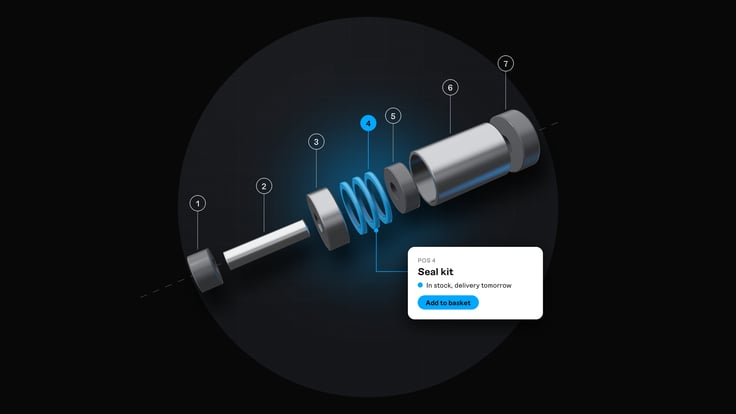


A wheel loader stands still on a construction site. The service technician sends a photo of a broken part to your customer service team, who find the right exploded diagram in a PDF catalogue, look up the position number and then search for the item number in the ERP system. It turns out the item was replaced by a new one two years ago, and the new one has a different supplier and a different lead time. The customer gets an answer after half a day, and the machine has been standing still the whole time.
This is what spare parts sales look like at many manufacturers, and it is rarely because anyone is doing something wrong. The knowledge of which part fits which machine sits with a handful of people, the information is spread across the ERP system, the drawing archive and printed catalogues, and the phone is the only interface that ties it all together. According to Litium's report Nordic Digital Commerce in B2B 2026, 81 per cent of Nordic B2B companies sell through digital channels, and 31 per cent of revenue is digital. The aftermarket is often where the move to digital ordering pays off most, because the purchases are recurring, urgent and hard to get right without help.
This post is about the aftermarket flow: how the customer gets from a machine to the right part, what happens to items that have been replaced, and how consumables, urgent needs and dealers are handled in the same platform. What a customer portal for manufacturers should include in general is covered in the guide Customer portal commerce for manufacturers in 2026. Three systems come up throughout: the ERP system, which owns items, prices, stock and orders, PIM (Product Information Management), which owns product information and the relationships between products, and the platform or customer portal where the customer places the order.
1. Let the customer find the part from the machine, not from the item number
A customer buying a spare part almost never knows the item number. The customer knows which machine it is for, perhaps the model and year, and with some luck the serial number on the rating plate. A webshop that can only be searched by item number and product name sends the customer back to the phone.
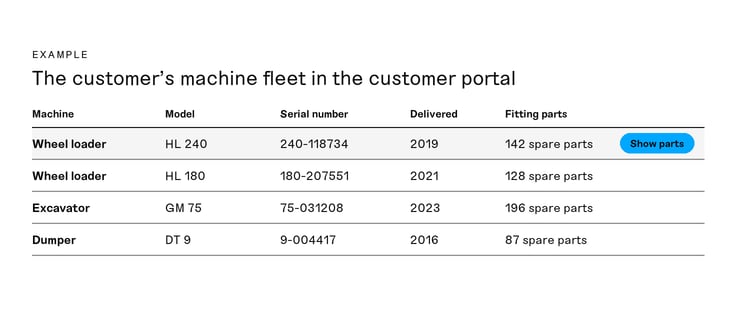
The starting point for selling spare parts online is therefore the link between machine and parts. It works best when the customer account knows the customer's machine fleet, often called the installed base. The customer logs in, selects the machine and only sees the parts that fit it. If you do not have data on which machines have been delivered to which customer, you can start with search by model and serial number and build the link to the customer account over time.
Data on delivered machines usually sits in the ERP system or in a separate service system, while the relationships between a machine model and its parts need to be managed as product data. Litium PIM supports relationships between parent products, variants, accessories and spare parts, so the same relationship can be shown on the product page, in the customer's machine view and in search results.
Questions to ask the vendor:
- Can the customer search by serial number, model and old item numbers, and not only by the current item number?
- Can a machine fleet be linked to a customer account, and where does the data come from?
- How are parts that fit several machine models shown without duplicating the product?
- What does a customer see when searching for a model you have no spare parts data for?
2. Build the spare parts catalogue as product data, not as a PDF
The printed spare parts catalogue with exploded diagrams and position numbers is a proven way of showing how a machine is built. The problem is that it goes out of date the day an item is replaced, and that nobody can order from it.
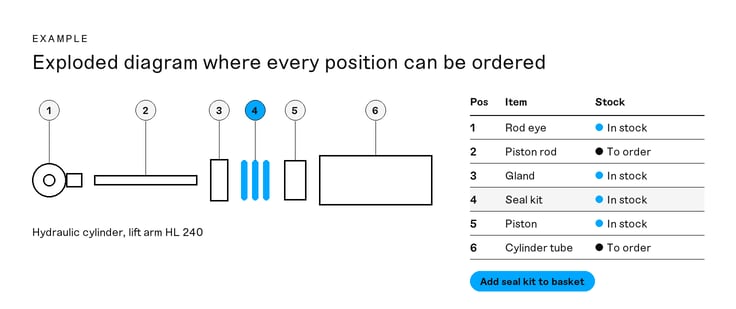
A digital spare parts catalogue follows the same logic, but every position in the diagram is linked to a sellable item with the price and stock status for the logged-in customer. For this to work, you need to separate the engineering bill of materials from the sellable spare parts catalogue. The bill of materials in the ERP system contains everything that goes into the machine, while the catalogue should only show what the customer can buy: individual parts, service kits and assemblies sold as one item.
Putting that together is product data work, and it belongs in PIM. That is where you decide which positions are sellable, which parts go into a service kit and which images, dimensions and assembly instructions belong to each part.
engcon, which manufactures tiltrotators and attachments for excavators, has built its spare parts business on Litium, integrated with the Monitor ERP system. The exploded diagrams are not built by hand in the webshop. They are pulled in automatically from engcon's internal systems together with the item mappings, quantities and comments. When a diagram is updated there, the change is synchronised and the items are placed in the correct structure without manual work. The solution was built by implementation partner Adeprimo and covers close to 4,000 items.
The effect of making products easier to find is clear at Swede-Wheel, which supplies wheels and casters. Navigating the old tree structure required at least six to eight clicks to reach a product page, and with filtering on product parameters customers now find the right product much faster. The number of 3D file downloads has increased by 100 per cent since the platform was launched.
Requirements to set:
- Can an exploded diagram be linked to items so that every position number leads to an orderable row?
- Where is the difference between the bill of materials and the sellable catalogue managed, and who updates it?
- Can service kits and assemblies be shown both as one item and with their contents?
- How are documents such as assembly instructions and safety data sheets handled per part?
3. Handle replaced and discontinued items so the customer still finds the right part
A machine sold today will need spare parts for ten, fifteen or twenty years. Over that time suppliers change, designs are improved and item numbers are replaced. If the platform only shows current items, the customer gets an empty search result when searching for the number printed on the old part.
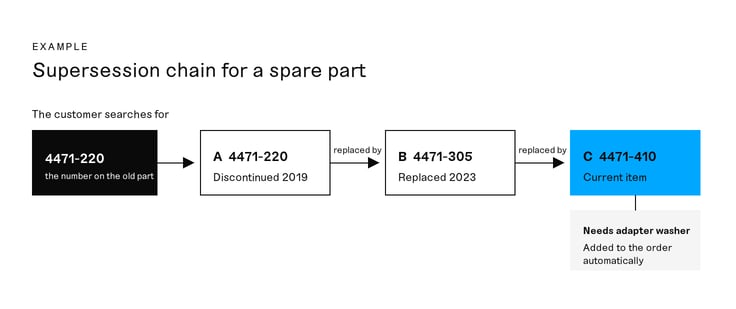
What you need are supersession chains: item A has been replaced by item B, which in turn has been replaced by item C. The customer should be able to search for A and arrive at C, with a clear note that the item has been replaced. Sometimes the new part does not fit straight away, and then the relationship also needs to state what is required for it to fit, such as an extra washer or a different seal.
It is just as important that parts for machines no longer sold stay in the catalogue. BB Safety, a supplier of personal protective equipment for professional users, launched its new B2B e-commerce on Litium in just three months. Its customers can easily find spare parts and accessories for technical products, even for items that are no longer sold.
Requirements to set:
- Can an item be shown as replaced with a link to its successor, and does searching for the old number work?
- Can a replacement be linked to a condition, such as an extra part being needed for the new one to fit?
- How long do discontinued machines and their parts stay in the catalogue, and who decides?
- Where does the supersession information come from, the ERP system or PIM, and how is it synchronised?
4. Show stock, lead time and delivery options to the customer whose machine is down
A new machine is planned for months. A spare part is often bought because something has broken, and then the question is not only what the part costs but when it can be on site. A platform that only shows "in stock" or "out of stock" does not answer that question.
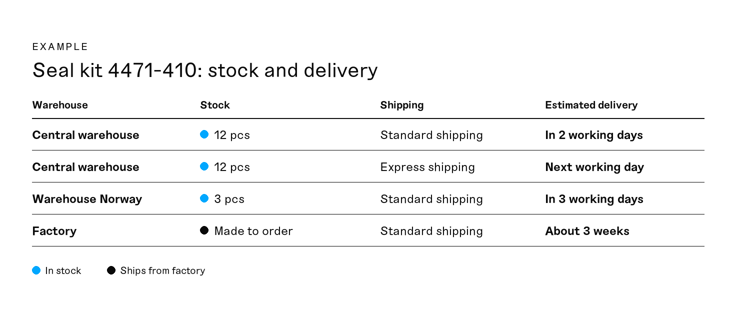
For spare parts, the customer needs to see three things: whether the part is available, where it is and when it can be delivered. If you have several warehouses, or parts shipped directly from a factory or a subcontractor, the lead time should be shown per option. The customer should also be able to choose faster shipping, split an order so that stock items are sent straight away, and see a realistic delivery date for the rest.
The ERP system is the source of truth for stock and lead times, and how to build the synchronisation is described in How to sync ERP and stock data in B2B e-commerce. In the aftermarket it matters even more that the stock shown is up to date, because a customer who gets the wrong answer about an urgent part rarely tries the digital channel again.
At Swede-Wheel, nearly 2,000 registered customers have access to stock availability, customer-specific pricing and documentation in a customer portal integrated with the Monitor ERP system, and around 40 per cent of them use these services regularly. "Connecting Litium’s platform to Monitor has simplified everything from customer support and administration for routine queries to product data management, saving us an enormous amount of time," says Emilia Haglund, customer support at Swede-Wheel.
Requirements to set:
- Can stock and lead time be shown per warehouse and per delivery option?
- How is a part shown that is not in stock but can be ordered from the factory or a supplier?
- Can the customer choose express shipping and split an order between stock items and made-to-order items?
- How old may the stock figure be when the customer sees it, and what is shown if an update fails?
5. Turn consumables and wear parts into recurring orders
A large part of the aftermarket is not about breakdowns but about predictable purchases: filters, blades, wear parts, oils and other items replaced at regular intervals. Those purchases tend to go to the supplier that is easiest to order from, and that does not have to be you.
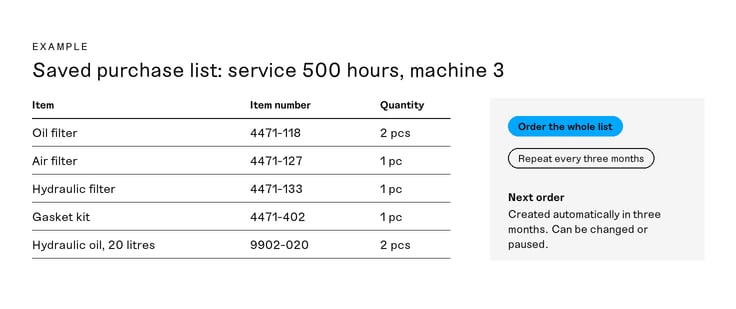
Make it easy to buy the same thing again. Saved purchase lists per machine or per service interval, service kits that bring together everything needed for a given service and recurring orders at a chosen interval remove work for both you and the customer. Litium Commerce Cloud supports spare parts and consumables, recurring orders and customer-specific assortments, so the same flow works for the urgent purchase and for planned replenishment.
Larger customers often want to order from their own procurement system instead of logging in with every supplier. Litium supports punchout and EDI, which means the customer's buyers can bring up your items and prices from within their own system and send the order back without it being keyed in by hand. The contract price should be the same whichever route the order takes, and how to build the pricing logic is covered in How does customer-specific pricing work in B2B e-commerce?
Requirements to set:
- Can the customer save purchase lists per machine and order the whole list in one click?
- Can an order be repeated automatically at a chosen interval, and can the customer change or pause it?
- Can service kits be shown with their contents and ordered as one item?
- Is there support for punchout and EDI with the procurement systems your largest customers use?
6. Give dealers, workshops and service technicians their own roles in the flow
At many manufacturers, the aftermarket does not go directly to the end customer. It goes through dealers with their own stock, their own workshops and their own customers, and sometimes through service technicians ordering on site. Each role needs something of its own: the dealer wants to buy for stock on its own terms and sometimes place an order on behalf of an end customer, while the service technician wants to find and order a part from a mobile phone without seeing the dealer's purchase prices.
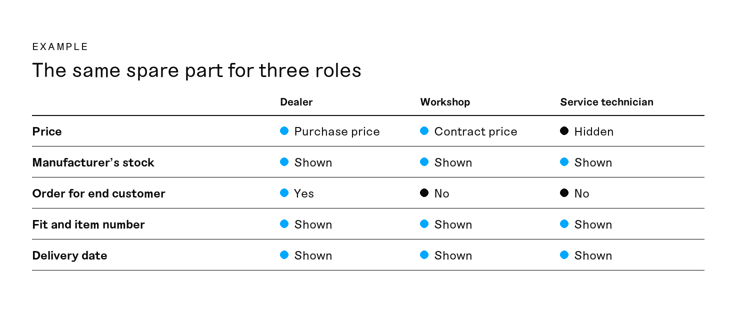
The platform therefore needs to handle customer accounts with several users and different permissions, different price lists per role and several languages and currencies when the dealers are in several countries. Litium's customer portal supports multiple languages, currencies and customer accounts, and spare parts, technical documentation and support cases can be gathered in the same portal.
engcon sells through 15 sales companies in 17 markets, and for its customers every lost hour with a machine standing still affects their operation. The spare parts business therefore has customer-specific price lists, logged-in customers and separate stock per country, and it is set up to be rolled out market by market. It went live together with engcon's move to Monitor and is now established in several markets. "Litium offers a modern and integrated solution that makes it easy for us to manage our extensive spare parts range and create a seamless experience for our customers worldwide," says Patrik Kutto, Regional Manager Nordics and Head of E-Commerce at engcon group.
Requirements to set:
- Can a dealer place an order on behalf of one of its customers, with the right delivery address and the right price?
- Can prices be hidden for certain users within the same customer account?
- Do search and ordering work on a mobile phone for a technician standing next to the machine?
- How are warranty claims and returns of spare parts handled, and are they visible to both dealer and manufacturer?
Summary: checklist for selling spare parts online
You do not have to build everything at once. Many manufacturers start with the aftermarket as a defined first phase, because the purchases are recurring and the customers already know what they need, and then expand to the full range. Go through the list with the platform vendor and the implementation partner and decide which points need to be in place from the start.
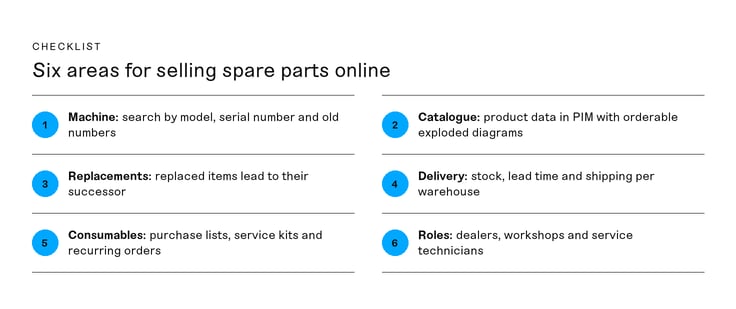
- The customer can find parts by machine model, serial number and old item numbers.
- The customer account can be linked to the customer's machine fleet.
- The spare parts catalogue is built on product data in PIM, with exploded diagrams where every position can be ordered.
- The bill of materials and the sellable catalogue are kept separate, with a named owner for the catalogue.
- Replaced items lead to their successor, and parts for discontinued machines remain available.
- Stock, lead time and delivery options are shown per warehouse, including for made-to-order items.
- Consumables can be bought through purchase lists, service kits and recurring orders.
- Punchout and EDI work with your largest customers' procurement systems.
- Dealers, workshops and service technicians have their own roles, prices and permissions.
For manufacturers running Monitor, there is a route where the connection between the ERP system and the portal is already built. Litium Core is a pre-configured portal for orders and product information with PIM and a ready-made Monitor integration, where Monitor remains the source of truth. That lets you put the work into what is specific to your aftermarket: product data, relationships between machines and parts, and how your customers and dealers order. If you run a different ERP system, or need a spare parts portal with its own frontend, the full platform applies, with ERP integration to Jeeves, Business Central and SAP among others, together with an implementation partner. Glänser is one example of a Litium partner that builds service and spare parts portals.
Frequently asked questions about selling spare parts online
Here we answer the most common questions from manufacturers who want to sell spare parts, wear parts and consumables online to customers, dealers and service technicians.
What is a digital spare parts catalogue?
A digital spare parts catalogue shows which spare parts belong to a particular machine or product, often with exploded diagrams where every position number is linked to an orderable item. Unlike a PDF catalogue, it shows the current price, stock status and replacement items for the logged-in customer, and it is updated when the product data changes.
What is the difference between a bill of materials and a spare parts catalogue?
The bill of materials in the ERP system describes everything that goes into a machine when it is manufactured. The spare parts catalogue only shows what the customer can buy: individual parts, service kits and assemblies sold as one item. The catalogue should therefore be built as product data in PIM, using the bill of materials as input, rather than publishing the bill of materials directly.
How does a customer find the right spare part without an item number?
The customer should be able to search for what is printed on the machine or the part: model, year, serial number or an old item number. It works best when the customer account is linked to the customer's machine fleet, so the customer selects a machine and only sees the parts that fit. Exploded diagrams help the customer point out the right part visually.
How do you handle spare parts that have been replaced by a new item?
Build supersession chains where the old item points to its successor. A customer searching for the old number should arrive at the current item with a clear note about the change. If the new part needs something extra to fit, such as an adapter or a different seal, that should be part of the relationship and ideally be added to the order.
Can you sell spare parts for machines that are no longer manufactured?
Yes, and that is often where the need is greatest, because the customer has nowhere else to go. Discontinued machines and their parts should stay in the catalogue for as long as you sell parts for them. Decide who is responsible for removing a machine from the catalogue, so that it does not happen by mistake when the range is cleaned up.
Should spare parts data live in the ERP system or in PIM?
The ERP system is the source of truth for item numbers, prices, stock and orders. Relationships between machines and parts, exploded diagrams, images, documents and supersession information belong in PIM, because they are product information that is presented and maintained for sales. Decide for each piece of data which system owns it and how it is synchronised.
How do you show lead times for spare parts that are not in stock?
Show the lead time per delivery option instead of just "out of stock". A part shipped from the factory or from a subcontractor can, for example, be shown with an approximate lead time in weeks, while stock items are shown with an estimated delivery date. The data comes from the ERP system, and the customer should be able to split the order so that stock items are sent straight away.
How do you sell spare parts online through dealers?
Give dealers their own customer accounts with their own price lists, permissions and languages. They should be able to buy for their own stock and place orders on behalf of their end customers with the right delivery address. If service technicians at the dealer also place orders, the platform needs to be able to hide purchase prices for certain users within the same customer account.
Can spare parts orders come directly from the customer's procurement system?
Yes, through punchout or EDI. With punchout, the customer's buyer opens your catalogue from within their own procurement system, selects items and sends the basket back for approval. With EDI, orders and confirmations are exchanged automatically between the systems. Both routes should give the same contract price as an order placed in the platform.
Where should a manufacturer start with selling spare parts online?
Start with the parts and customers where purchases are most frequent and the customer already knows what they need, for example consumables and wear parts for your best-selling machines. Make sure the product data for those parts is complete, connect stock and prices from the ERP system and then expand with exploded diagrams, supersession chains and dealer roles.